横に伸びる、MacのためのアウトライナーA horizontal outliner for Mac

書く前に、
考えを構造にする。

Think in structure
before you write.

アイデアを出しただけでは、まだ文章にはなりません。並べ、関係づけ、構成し、構造と論理をつくる。その「文章になる前」を、横に伸びるアウトラインで考えるためのMacアプリがBreathink Basicです。

Ideas alone do not yet make a piece of writing. They need to be arranged, related, structured, and turned into logic. Breathink Basic is a horizontal Mac outliner for that crucial stage before drafting.

AIなし。アカウント不要。文書はMacの中に。考えることだけに集中できます。

No AI. No account. Your documents stay on your Mac. Just a quiet place to think.

macOS 12.0以降 / Apple M1以降のMac | iOS版も開発中
Requires macOS 12.0 or later / Apple silicon Mac | iOS version in development
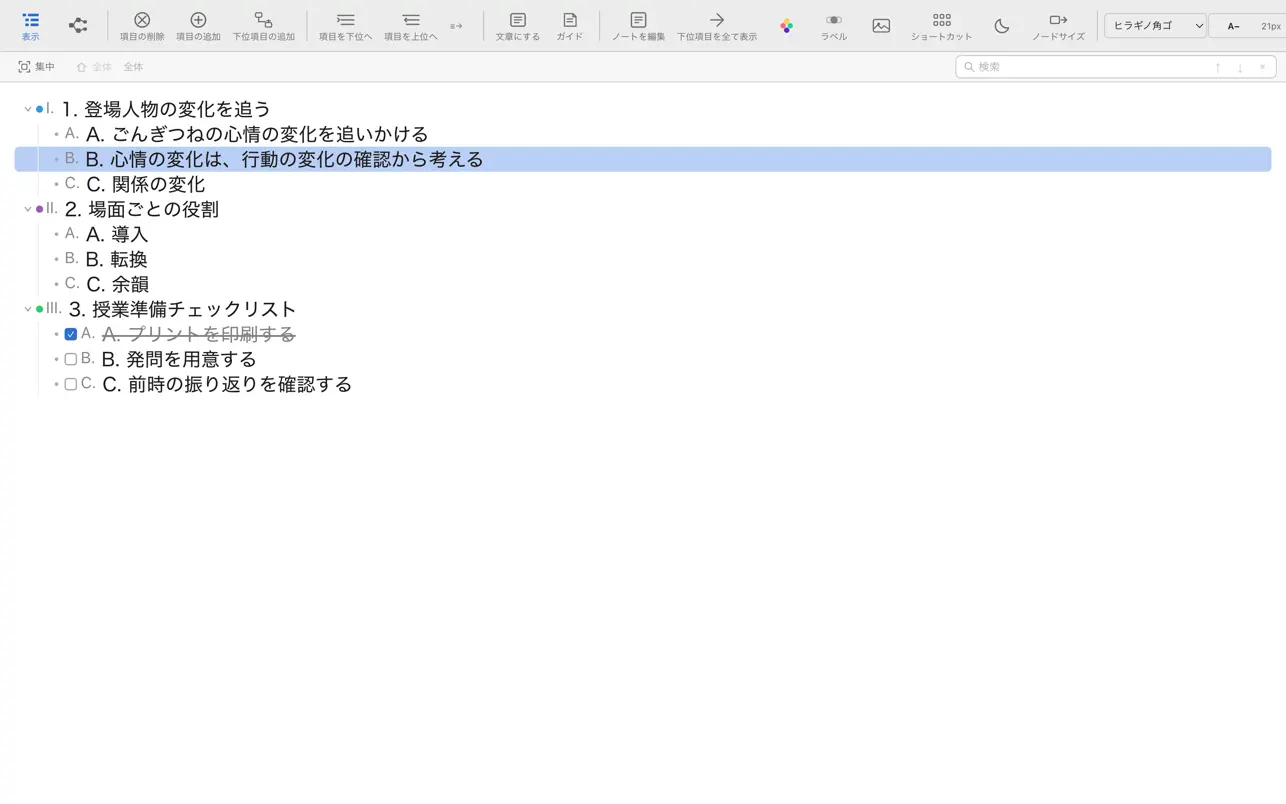
Breathink Basicの実際のアウトライン画面
The missing middle

アイデアと文章の間には、
本当は大切な工程がある。

Between ideas and writing,
there is a crucial middle stage.

文章は、思いついたことをそのまま書けばできるわけではありません。 アイデアを選び、並べ、つなぎ、まとまりをつくり、論理の流れを整える。 この「構成・構造・論理化」の工程があって、はじめて文章として書き始めやすくなります。

Writing does not emerge simply by turning raw ideas into sentences. Ideas must be selected, ordered, connected, grouped, and shaped into a logical flow. That middle stage is what makes drafting possible.

STEP 1
アイデア Ideas 思いつき、材料、言いたいこと、事実、問い。 Thoughts, materials, claims, facts, questions.
STEP 2 — Breathink Basic
構成・構造・論理化 Structure & Logic 並べる。動かす。階層にする。関係づける。順序を決める。横に伸びるアウトラインで、考えの形を見えるようにする。 Arrange. Move. Nest. Relate. Sequence. Make the shape of your thinking visible in a horizontal outline.
STEP 3
文章 Writing 骨組みができているから、文章として書き出しやすくなる。 Once the structure exists, drafting becomes much easier.
多くの人が難しさを感じるのは、アイデアがないからではなく、 アイデアを文章へ変えるための中間工程が抜けているからかもしれません。 Breathink Basicは、その間を埋めるためのアウトライナーです。
The difficulty is often not a lack of ideas. It may be the missing middle between ideas and prose. Breathink Basic is designed to fill that gap.
Why Breathink

文章が書けないのではなく、
構造がまだ見えていないのかもしれない。

Maybe the problem isn’t writing.
Maybe the structure isn’t visible yet.

本文を書き始める前には、考えを出し、関係を見つけ、順序を決める時間があります。Breathinkは、その思考過程を画面の上で動かせるようにします。

Before sentences come ideas, relationships, and order. Breathink gives that invisible thinking process a place you can see and rearrange.

01

まず、出すCapture

完成した文章にしようとせず、思いつきを短い見出しとして置いていきます。

Put down rough ideas as short headings without forcing them into finished prose.

02

動かして、比べるRearrange

順序を変え、親子関係をつくり、考え同士の関係を目で確かめます。

Change the order, create parent-child relationships, and make connections visible.

03

構造にするStructure

「これなら書ける」という骨組みができてから、文章へ進みます。

Move into writing only after you have a structure that makes sense.

How it works

考えることと、
文章を書くことを分ける。

Separate thinking
from drafting.

01
思いつきをノードにするTurn ideas into nodes一文を書き切らなくていい。まずは考えの部品を置きます。You do not need a polished sentence. Start with the pieces of your thinking.
02
ドラッグして順番を変えるMove things around書きながら悩む代わりに、構成そのものを直接動かします。Instead of struggling inside paragraphs, manipulate the structure directly.
03
階層をつくるBuild hierarchy大項目・中項目・具体例。考えの粒度と関係が見えてきます。Main points, subpoints, examples—the levels and relationships become visible.
04
必要な形式へ書き出すExport when readyOPML、Markdown、HTML、テキスト、Word互換形式、PDFへ。Export to OPML, Markdown, HTML, text, Word-compatible format, or PDF.
AIに文章を作らせる前に、
自分で考えの構造をつくる。
Before asking AI to write,
build the structure yourself.
Breathink Basicには生成AIを入れていません。AIが不要なのではなく、人間が担う「選ぶ・並べる・関係づける」という思考を、静かに行うためです。
Breathink Basic intentionally has no generative AI. Not because AI is useless, but because choosing, ordering, and relating ideas are worth doing yourself.
Designed for focus

余計なものを増やさない。

Less between you and your thinking.

ローカル保存Local-first

文書データはMac内に保存。開発者サーバーへ文書内容を送りません。

Your documents stay on your Mac. Their contents are not sent to the developer’s server.

アカウント不要No account

ログインや会員登録のために思考を中断する必要はありません。

No sign-up or login standing between you and your work.

AIなしNo built-in AI

答えを出すためではなく、自分の考えを見つけるための道具です。

A tool for finding your own structure, not generating an answer for you.

開いた形式へExportable

OPML、Markdownなどへ書き出し。他の環境へ考えを持っていけます。

Export to formats such as OPML and Markdown, so your thinking can move with you.

横に広がる構造を見渡すSee structure across the page

縦にメモを積むだけでなく、階層を横方向へ広げながら、全体の関係を見渡せます。

Go beyond a vertical list: expand hierarchy sideways and keep the relationships visible.

Hoist・折りたたみ・検索Hoist, fold, search

大きな構造の中から、いま考える範囲だけに集中できます。

Focus on the part of a larger structure that matters right now.

買い切りOne-time purchase

Mac App Storeで¥1,480。日々の思考道具としてシンプルに使えます。

¥1,480 on the Mac App Store. A simple tool you can keep using.

For people who think before they write

こんな仕事の前に。

Before work like this.

論文・レポートPapers & reports章立て、論点、根拠を組み立てる。Shape sections, claims, and evidence.
授業づくりLesson planning教材、問い、活動、評価の関係を整理する。Organize materials, questions, activities, and assessment.
企画・提案Plans & proposals目的から施策まで、構造を崩さず考える。Move from purpose to action without losing the structure.
原稿・小論文Essays & drafts書き始める前に論理の流れを確かめる。Check the logic before writing full sentences.
Real screens

Breathink Basicでできることを、
実際の画面で見せる。

Show what Breathink Basic does
through real screens.

Breathink Basicでは、考えを「横に伸びるアウトライン」として整理できます。アウトライン構造とツリー構造を切り替えながら全体を見渡し、さらに、そのアウトラインをもとに文章を展開して書くことができます。

Breathink Basic lets you shape your thinking as a horizontal outline. You can switch between outline and tree structures, then use that outline as a base for expanding your writing.

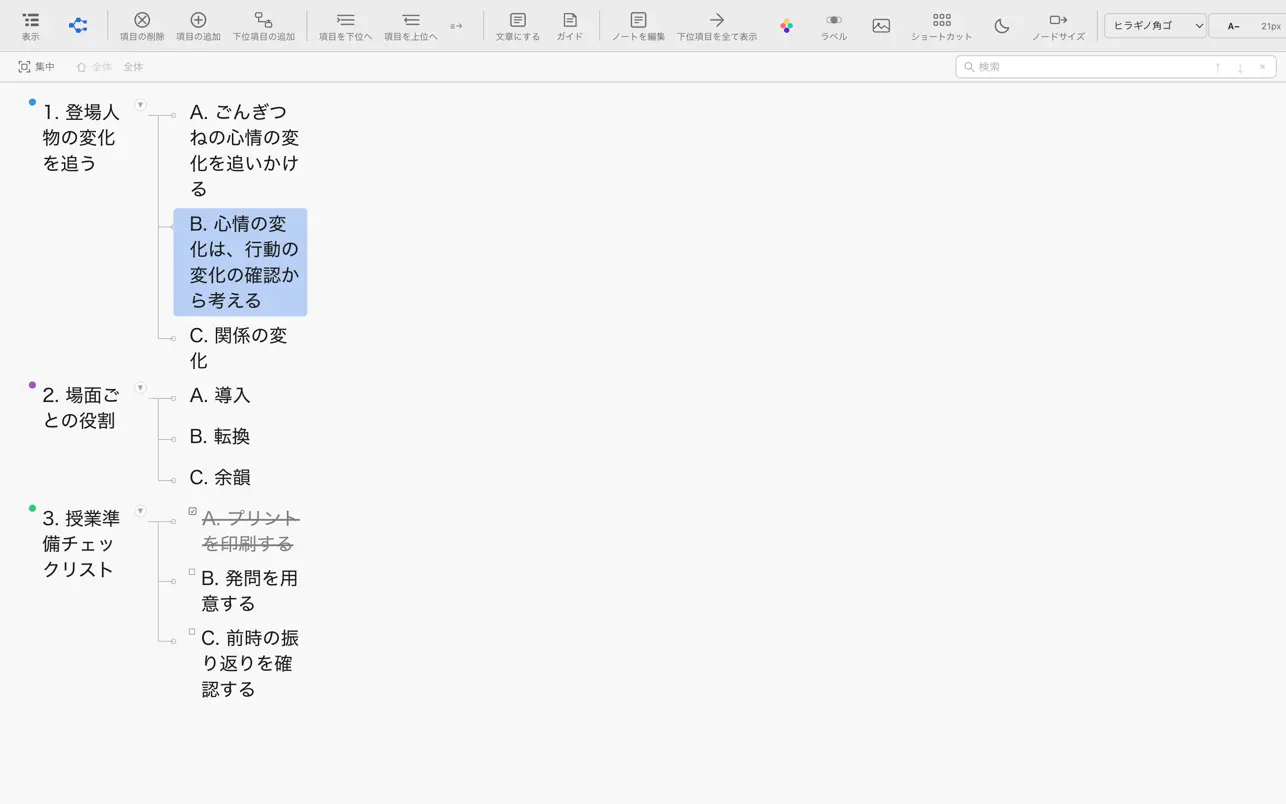
Breathink Basicのアウトライン構造画面

アウトライン構造

Outline structure

項目を並べ、入れ替え、階層化しながら、文章の骨組みを組み立てます。横に伸びる構造として見えるので、全体の流れを考えやすくなります。

Arrange, reorder, and nest items to build the skeleton of your writing. The horizontal structure makes the flow easier to grasp.

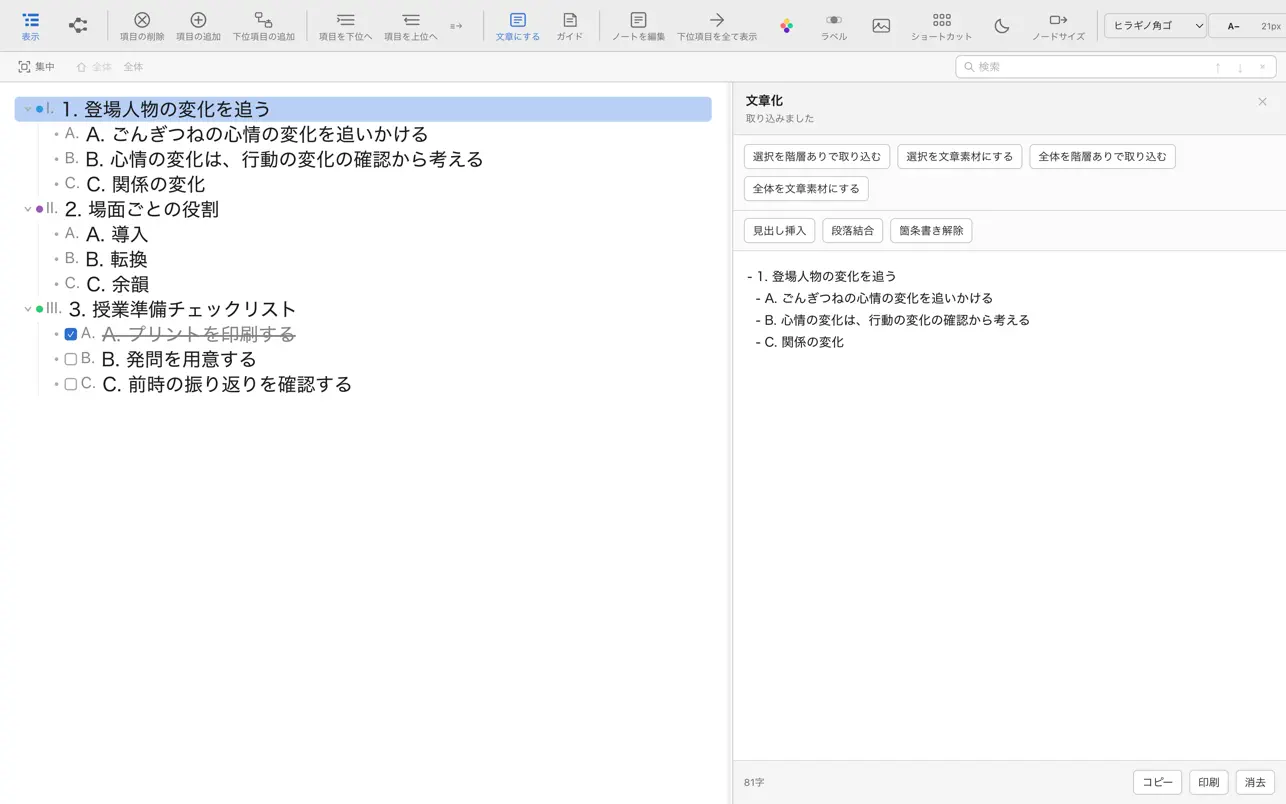
Breathink Basicのツリー構造画面

アウトライン構造 ⇄ ツリー構造

Outline ⇄ Tree structure

考え方や見たい粒度に応じて、アウトライン構造とツリー構造を切り替えられます。同じ内容でも、見せ方が変わると関係がつかみやすくなります。

Switch between outline and tree structures depending on how you want to inspect the same material. A different view can reveal relationships more clearly.

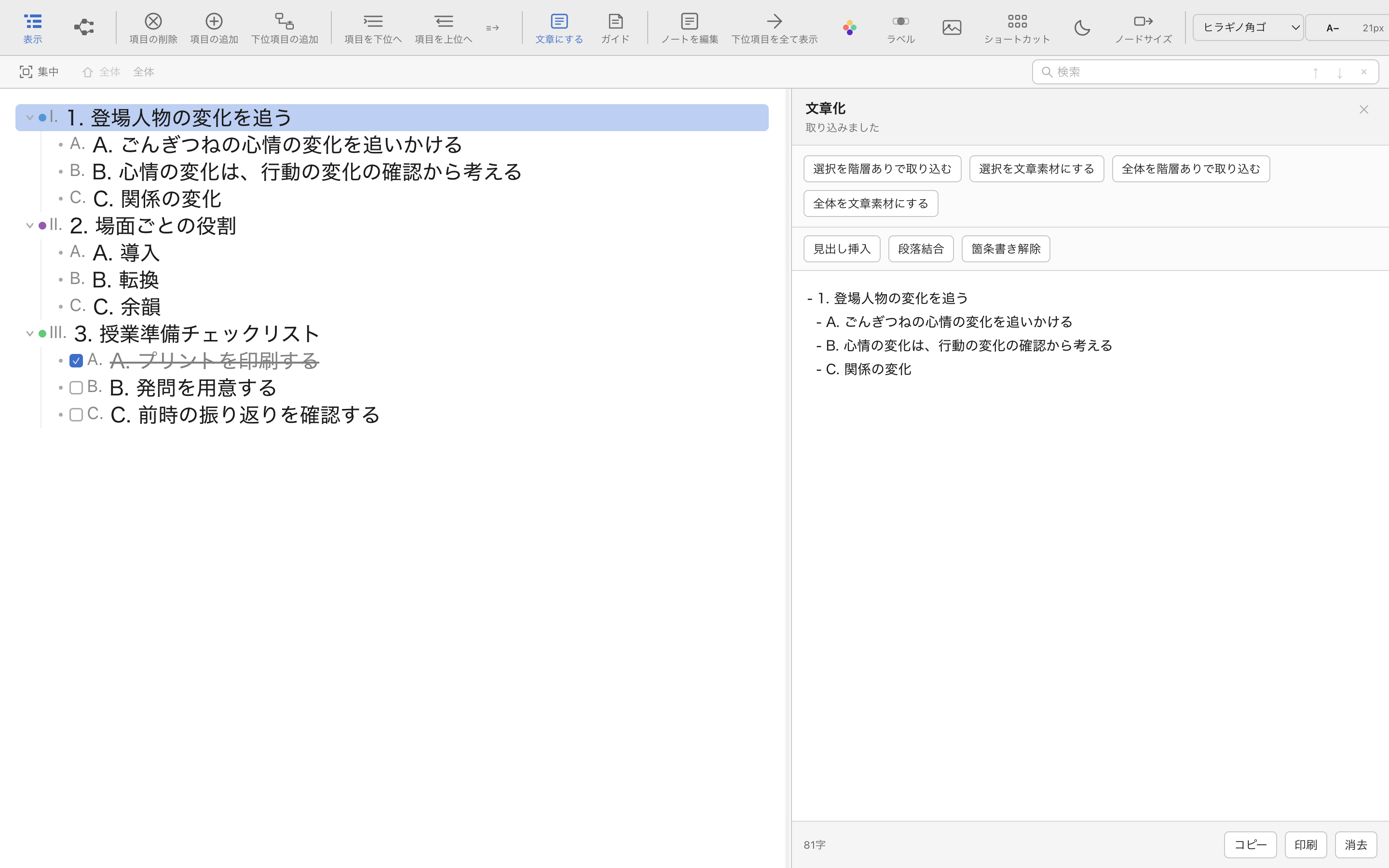
Breathink Basicの文章展開画面

アウトラインから文章へ

From outline to writing

構造を作ったあと、そのアウトラインを見ながら文章を展開して書ける場所があります。アイデアからいきなり文章に飛ばず、構造を保ったまま書き進められます。

Once the structure is ready, you can expand it into prose in a writing area. This bridges the gap between ideas and finished writing.

Watch Breathink

動いているところを見る。

See Breathink in action.

横に伸びるアウトライン、構造の切り替え、そしてアウトラインから文章へ進む感覚は、動画を見るとさらに伝わります。

The horizontal outline, structural switching, and the transition from outline to writing are even easier to understand in motion.

Breathink Basic デモ動画

Breathink Basic demo

Breathink Basicの操作感と、アウトラインを使って考えを構造化していく流れを動画で確認できます。

Watch how Breathink Basic feels in use and how an outline can be developed into a visible structure for thinking.

FAQ

よくある質問Frequently asked questions

どんなMacで使えますか?Which Macs are supported?

現在のBreathink Basicは、macOS 12.0以降、Apple M1以降のチップを搭載したMacで利用できます。iPhone・iPad向けのiOS版も現在開発中です。

The current Breathink Basic runs on Macs with macOS 12.0 or later and Apple M1 or later. An iOS version for iPhone and iPad is currently in development.

生成AIは入っていますか?Does it include generative AI?

Breathink Basicには生成AI機能はありません。自分で考えを出し、並べ、構造化するためのシンプルな思考支援ツールです。

No. Breathink Basic is intentionally a simple tool for capturing, arranging, and structuring your own ideas.

データはクラウドへ送られますか?Are my documents uploaded to the cloud?

文書データはMac内に保存されます。アカウント登録は不要で、開発者サーバーへ文書内容を送信しません。

Documents are stored on your Mac. No account is required, and document contents are not sent to the developer’s server.

他のアプリへ移せますか?Can I move my outline to other apps?

OPML、Markdown、HTML、テキスト、Word互換形式、PDFへの書き出しに対応しています。

Yes. Breathink Basic can export to OPML, Markdown, HTML, text, Word-compatible format, and PDF.

文章の前に、構造を。

Structure before sentences.

考えがまだまとまっていない時間を、
もっと大切にするためのアウトライナー。

An outliner for the important moment
before your thinking becomes a finished draft.

Breathink BasicをApp Storeで見るView Breathink Basic on the App Store